Why NFT Randomizer?
NFT Randomizer is the only plugin for Cinema4D that allows you to mix your 3D elements and prepare your NFT collection for a future submission to the blockchain.
It also generates the JSON metadata files describing every image it produces, following the OpenSea standard, so a collection is ready to mint the moment your renders finish.
Prerequisites
The plugin requires Cinema 4D R23 or later. Earlier releases ship an older Python version that the plugin is not compatible with. It has been tested from R23 to R26.
Installation
Place the plugin folder in the plugins directory at the root of your Cinema 4D installation. NFT Randomizer then appears under the Extensions tab of the software.
Categories
Your 3D scene must contain a neutral for each category. The name given to this neutral is the one that will be used and written for your metadata, so be careful to properly name your categories, for example Hat, Body, Glasses.
Attributes
Each category contains the different possible attributes, also as neutrals. The name given to an attribute is likewise the name used when writing the metadata, for example Bowler hat, Pirate hat, Cap.
Rarity of attributes
Every attribute needs a rarity weight, entered as a decimal or integer value placed as the first child of the attribute. For instance, the first child of “Purple Hat” would be a neutral named “0.5”.
The probability of an attribute appearing is:
probability = (weight of attribute / sum of all weights in the same category) × 100Example: in the category “Hats”, with “Rare Hat” at a weight of 0.8, “Uncommon Hat” at 50 and “Common Hat” at 165, the probability of seeing “Rare Hat” is 0.8 / (0.8 + 50 + 165) = 0.0037, a 0.37 % chance that a combination has a “Rare Hat”.
Exclude attribute combinations
To stop two attributes from ever appearing together, add a neutral named excluded as the second child of the attribute (just below its weight). Give it children named with the syntax category:attribute. Every attribute listed under “excluded” will never be used in combination with the parent attribute.
Hats
└── Pirate hat
    ├── 38              ← weight
    └── excluded
        ├── Glasses:Sunglasses
        └── Hair:Long hair
Generating your NFTs
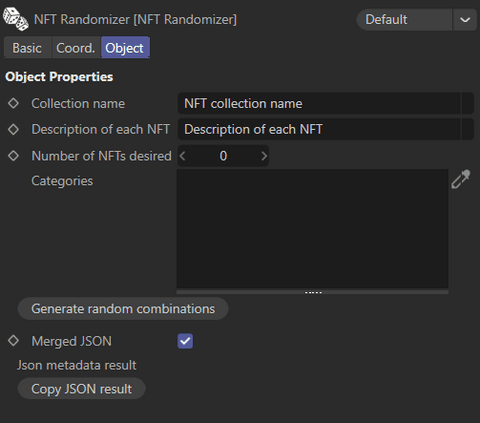
Drag each of your categories into the Categories field of the NFT Randomizer panel, enter the number of NFTs you want, then press Generate random combinations.
The plugin creates animation keys on the visibility of your attributes, one unique combination per frame, and writes the JSON metadata file at the root of your project. You can also copy the result straight to your clipboard with the Copy JSON result button.
Separated JSON files
By default all metadata is written into a single merged file. Uncheck Merged JSON to create one individual JSON file per NFT instead. They land in a json_files folder.
Video tutorial
The full walkthrough, from scene setup to generated collection:
Excluding combinations
Something not covered here?
The FAQ covers the most common errors and edge cases, and we answer every message.