
Create your own NFT collection on Cinema 4D
NFT Randomizer mixes and matches the 3D objects in your scene to generate thousands of unique combinations, with rarity weights, excluded pairs, and JSON metadata written for you.
$99$199.99−50%One-time payment · Lifetime licence
- Cinema 4D versions
- R23 → R26
- Unique combinations
- Millions
- Metadata standard
- OpenSea
- Render engine
- Any
Cinema 4D versions
Unique combinations
Metadata standard
Render engine
Features
Everything you need to ship a collection
The NFT Randomizer plugin for Cinema4D is the ultimate tool for 3D content creators.
Mix & match your 3D objects
Drop your categories into the plugin and it shuffles every element of your Cinema 4D scene into unique attribute combinations: one per frame, thousands per run.
Rarity weights per attribute
Give every attribute a weight and control exactly how often it shows up. A 0.8 weight next to a 165 makes a genuinely rare trait, not a random one.
Excluded combinations
Some hats just don't work with some hairstyles. Declare the pairs you never want to see and the generator will route around them.
OpenSea-ready JSON metadata
Every generated frame is written out as metadata following the OpenSea standard, either merged into one file or one JSON per NFT.
Works with every renderer
The plugin only animates attribute visibility, it never touches your render settings. Redshift, Octane, Arnold and Physical are all compatible.
No code, no scripting
Name your neutrals, drag your categories in, press generate. If you can organise an object manager, you can ship a collection.
How it works
Four steps, no scripting
Organise your Cinema 4D scene, set the weights, and let the plugin do the combinatorics.
- 1
Install the plugin
First, install the plugin by downloading it and placing it in the plugin folder of your Cinema4d software. You can then access it from the "extension" tab of the software.
- 2
Set the rarity
Arrange your different 3d elements in categories. Place them preferably in neutral objects. For example, all your objects representing the category "hats" in a neutral object named "hats". Name your objects carefully because the names will be used in the metadata json. Place the probability (or weight) of occurrence of each object as the first child of each object. Example: 0.5 for "Purple Hat".
- 3
Excluded combinations
You can also place a neutral that you will call "excluded" at the second position (below the weight) with as child all combinations of NFTs with which you do not want your attribute to be mixed in the form of neutral "category:attribute".
- 4
Generate your NFTs
Finally, you just have to place each of your categories in the window of your NFT Randomizer extension and press the "Generate Random Combinations" button. Now your NFTs are generated on each frame of your C4D scene, you can retrieve your metadata file at the root of the project or copy them directly with the "Copy JSON results" button!
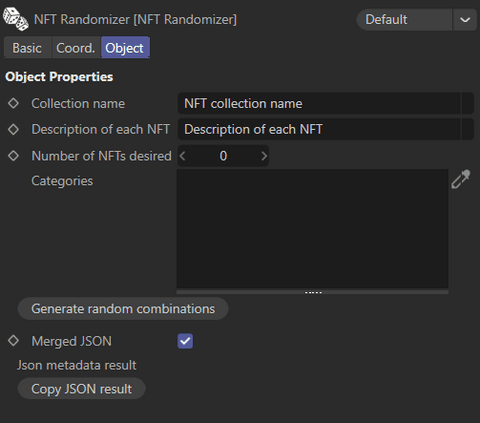
The plugin panel: drop your categories in, set a count, press generate.
Full tutorial · excluded combinations guide
“My goal was to generate my NFT collection as easily as possible without much technical knowledge.”
Pricing
One plugin, one price
No subscription, no per-collection fee. Buy it once and generate as many collections as you like.
NFT Randomizer 1.8 for Cinema4D
Cinema 4D R23 → R26
$99$199.99USD
- Rarity weights on every attribute
- Excluded attribute combinations
- Merged or per-NFT JSON metadata
- Compatible with every render engine
- Lifetime licence, free 1.x updates
Secure payment · Digital product, non-refundable
FAQ
Questions we get a lot
Which versions of Cinema4D are compatible?
The plugin has been tested and works from version R23 to R26. If you notice any problem please contact us, we will be happy to help you and improve our tool.
How can I generate metadatas for each NFT in separate JSON files?
It’s very simple, just uncheck the "Merged json" box.
How to recover metadatas after randomization?
After having pressed the button of generation of the NFTs, it is enough to press the button “Copy JSON result” to have the result of your generation.
The installation of the plugin does not work.
Depending on the version of Cinema4D, the plugins are not installed in the same way. Sometimes you have to install it from the preferences folder, accessible in the “edit” menu of the software. Sometimes you have to place it directly in the plugin folder in the application directory. If the problem persists do not hesitate to contact us, we will be happy to help you.
What does this plugin have to do with the HypedKids NFT collection?
This plugin was originally created to generate the HypedKids NFT collection by the HypedKids 3D designer. The collection is coming soon!
How to define the probability of occurrence of each object?
Place the probability of each object as the FIRST child of each object. Example: The first child of “Purple Hat” would be a neutral with the name “0.5”.
Ready to generate your collection?
Stop keyframing visibility by hand. Let NFT Randomizer handle the combinatorics, the rarity and the metadata.